Meeting Notes Software: How to Compare Tools
ToolMatch · Last reviewed: 3 September 2026 · Trust / Compare / Decide
Meeting notes software is not just a transcription feature. A useful system captures the right audio, creates a reviewable record, turns decisions into owned work, and keeps access and consent understandable.
Compare like with like
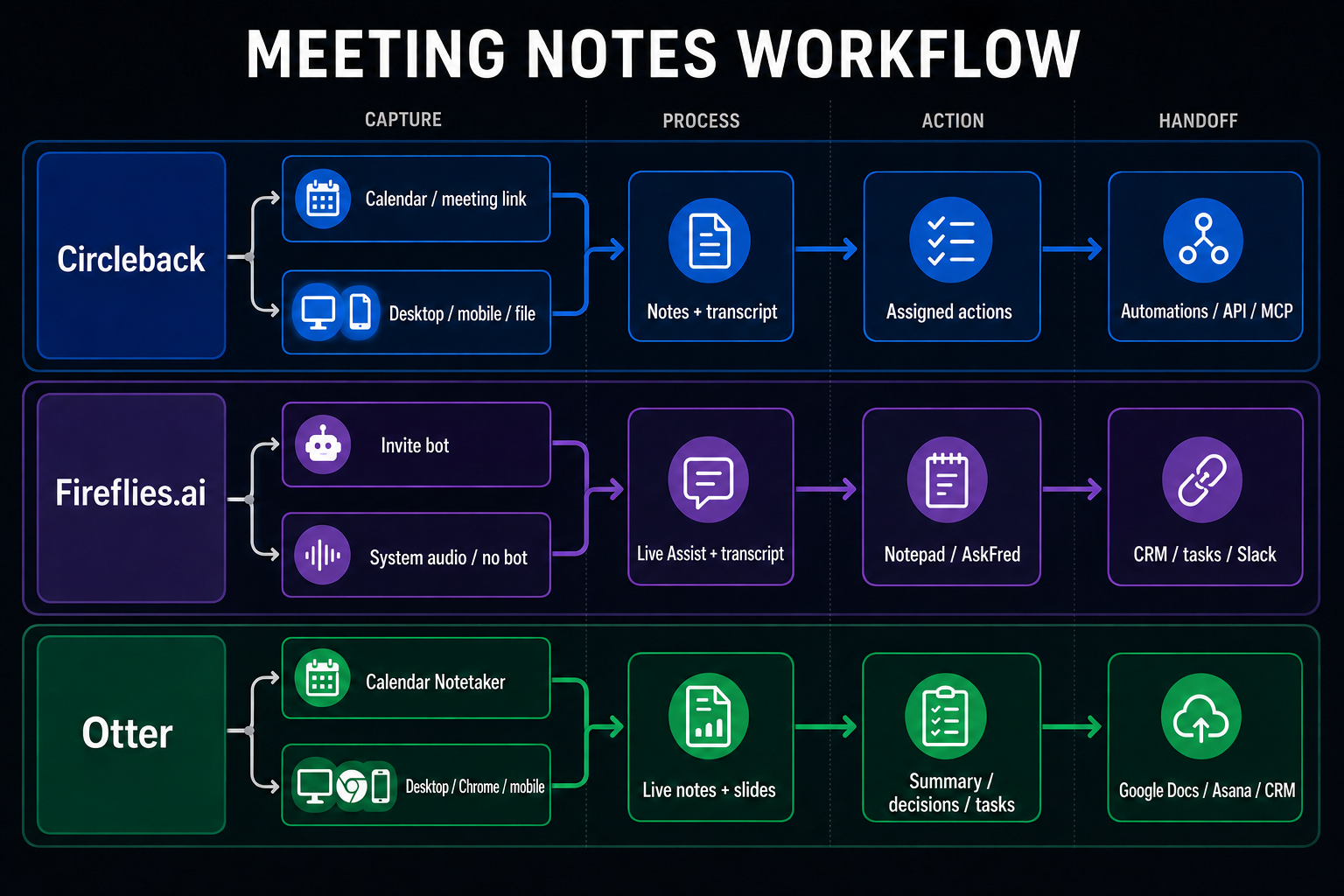
This guide compares three dedicated AI meeting assistants: Circleback, Fireflies.ai, and Otter. They share the same core job—capture a meeting, produce notes or a transcript, extract decisions and action items, then hand the result into a team workflow. Workspace-native products such as Notion AI Meeting Notes are adjacent and are intentionally excluded from this shortlist.
Before comparing brands, define the job: for example, “after a weekly sales call, produce a searchable transcript, a decision summary, and action items with an owner and due date.” Add the meeting platform, languages, team size, data sensitivity, and whether participants need a visible consent process.
Current options to investigate
| Option | Capture | Notes and decisions | Handoff / fit question |
|---|---|---|---|
| Circleback Official site | Calendar connection plus desktop/mobile and other capture methods. | AI notes, transcript, automatically assigned action items and searchable meeting context. | Automations, API/MCP/webhooks and app integrations; verify platform, language, retention and plan limits. |
| Fireflies.ai Official site | Meeting bot, Chrome extension, mobile, desktop and audio/video upload. | Transcript, summary, searchable history and action items. | CRM, project-management tools and Slack; verify bot/capture consent, storage and plan limits. |
| Otter Official site | Calendar-scheduled meeting agent, desktop/Chrome/mobile and file workflows. | Live notes/transcript, summaries, decisions and assigned action items. | Asana, Google Docs, CRM and other integrations; verify supported platform, capture mode and export needs. |
The table compares the same capture-to-action job, not a universal ranking. Features, plans, integrations, and regional availability can change; verify the provider's own documentation at the time of the decision.
1. Compare the capture model
Ask how the recording starts and what the software can hear. A bot that joins a video call, a bot-free desktop recorder, a browser microphone, a mobile recorder, and an uploaded audio file are different workflows. They differ in setup, participant visibility, system-audio capture, failure modes, and where the audio is processed.
- Automatic join: convenient for recurring calls, but check participant notification, calendar access, and meeting policy.
- Desktop or bot-free capture: can reduce meeting clutter, but verify operating-system permissions and whether it captures all speakers.
- Manual upload: useful for existing recordings, but inspect supported file types, processing time, storage, and deletion.
2. Test transcript and summary quality separately
A readable summary can hide a weak transcript. Use the same short meeting or recording in each option and inspect names, numbers, decisions, objections, speaker changes, and technical terms. Then check whether the summary distinguishes a decision from a suggestion and an assigned task from a discussion point.
Measure corrections, not just the first impression. Record how many factual edits were needed, how long review took, whether the important decision was preserved, and whether the output can be regenerated after you change the summary instructions.
3. Check action-item handoff
Meeting notes create value when the work continues after the call. Verify whether an action item includes the original wording, an owner, a due date, and enough context to prevent rework. Then check whether the item can be copied or sent into the system your team actually uses.
Do not count an attractive list of “next steps” as project management. Test a real handoff with a reviewer. If the tool can write to another service, confirm the approval screen, the account permissions, and the recovery path before enabling that action.
4. Treat consent and privacy as product requirements
Recording and transcription can involve personal data, confidential information, and local recording laws. The tool must make it practical to tell participants when capture starts and what happens to the recording. Review provider terms, subprocessors, retention, deletion, regional handling, export, and workspace access.
Each provider's capture and privacy documentation should be checked before rollout. A bot joining a call, a desktop recorder, a mobile capture path, and an uploaded file create different consent, permission, retention, and deletion questions. These are workflow constraints, not minor settings.
5. Calculate total cost and review effort
Compare more than the subscription price. Record seats, meeting hours, AI credits, history, storage, integrations, exports, admin controls, and the plan needed for your language or meeting platform. Include the human cost of correcting transcripts and moving actions into another system.
A smaller team may prefer a simple recorder and a manual decision record. A larger team may pay for search, access controls, integrations, and consistent review. Choose the option that removes a measured bottleneck without creating a larger data-governance burden.
Run a low-risk pilot
- Choose one non-sensitive meeting with a clear owner for review.
- Record consent and the capture setup before starting.
- Compare the original meeting with the transcript, summary, decisions, and action handoff.
- Log corrections, review minutes, missing speakers, failed integrations, and deletion steps.
- Repeat once with a different speaker mix before rolling out to customers or confidential calls.
Decision rule
Choose a dedicated assistant when capture and searchable history are the core problem. Choose workspace-native notes when permissions, project context, and reuse inside an existing knowledge system matter more. If neither option meets the consent, language, or export requirement, mark it as a partial fit and keep the manual fallback visible.
Sources and update method
This guide was reviewed against Circleback's recording documentation, Fireflies.ai's desktop capture documentation, and Otter's meeting-agent documentation. We keep product facts conditional and re-check capture, plan, permission, and retention details before recommending a tool.